
Rust commands and server vars reference
The Commands tab is a built-in, searchable reference for Rust’s admin, creative and cinematic commands and every server variable, so you never have to leave the app or dig through a wiki to find the right one. Copy any command or convar in one click, then paste it into the F1 console in game or into your server config.
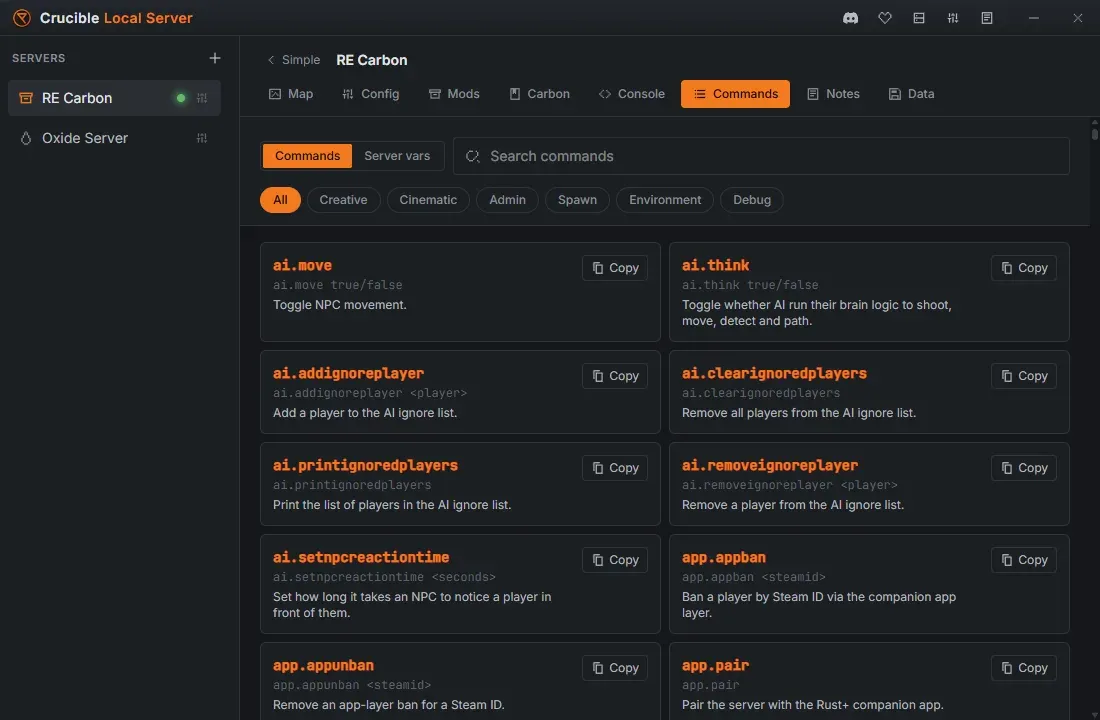
Two modes: Commands and Server vars
Section titled “Two modes: Commands and Server vars”A toggle at the top switches the tab between two reference sets:
- Commands: hundreds of admin, creative, cinematic, spawn, environment and debug commands, the kind you type into the F1 console or run over RCON to control a running server.
- Server vars: the full list of
svconvars, the settings that shape how the server behaves. Server vars copy with thesvprefix already attached.
Search and filter
Section titled “Search and filter”Both modes are built for finding a command fast:
- Search by name to filter the list as you type.
- Filter by category: Commands mode has category chips (admin, creative, cinematic, spawn, environment, and more), and Server vars mode has a category dropdown that groups every convar into readable buckets like Animals, Vehicles, Building, Events and World.
This tab copies, it does not run
Section titled “This tab copies, it does not run”The Commands tab is a reference. Every entry copies to your clipboard, and nothing here executes against your server, so you can browse it freely while a server is live.
The one place the app does run a command for you is the Carbon or Oxide guide tab on a modded server. Its plugin and permission commands each have a Run button that sends the command straight over RCON, active once the server is running and RCON is connected. Entries that need you to fill in a value first are marked Copy + edit instead, since only you know the value. See install mods and plugins.
Related
Section titled “Related”- Console, RCON, and admin tools for the live console, quick actions, and admin setup.
- Install mods and plugins for Carbon and Oxide plugin management.
- Create your first Rust server.